Views: 307
Floureon Cctv Firmware Update
I got myself a cheap CCTV system from eBay (also widely available on Amazon), it came by the name of “Floureon”, but from what I’m aware of, it’s one of those chinese systems that has many different brands but pretty much run the same operating system and GUI. One of the main features of the system is the ability to use XMEye for viewing the cameras remotely. So if your DVR supports XMEye, or has this interface, then it should be supported.
Overall they run some sort of Linux OS, some DVR’s come with features enabled like SSH, but the Floureon one I had didn’t seem to have SSH enabled. I wanted to explore the device and try to make modifications to it, pretty much a Custom Firmware. I could possibily change the colours of menus, change the boot logo, and perhaps enable SSH.
In this, I’ll be showing you how to grab the firmware, make modifications to it (in this case, change the boot logo), repackage it up and update it onto the DVR. (It took me about 2/3 days of work to figure it all out)
Requirements:
- 7Zip (so you’ll need Windows…)
- Linux (I used Linux Subsystem for Windows)
1. Finding The Correct Firmware
As I mentioned above, they can all have different brand names but they end up using the same interface and operating system, so all you need is the “model” (i guess) number which can be found in Info > Version
Take note of the 8 digit number after the R11 on “System”, mine was 00000117, now using this site, find the 8 digit number and download the corrosponding firwmare.
It’ll take you to a chinese site, and then you’ll have your hands on a .bin file
Load More : XMEYE Silver Style NVR Firmwares
2. Verifying The Correct Firmware
Before making any modifcations to it, the best thing to do is run the firmware on the DVR to make sure it takes it all fine.
You can do this in a few ways, such as using a USB (put the .bin on the root) and the menu interface, or by using this tool to push the firmware to the DVR over ethernet.
Just make sure the firmware runs through fine, so we can verify that it’s the correct update.
3. Start extracting the firmware
Using 7Zip, open up the .bin
You’ll find 4 .cramfs.img and an InstallDesc, I’ll be modifying the boot logo, therefore extract the logo-x.cramfs.img file.
Make a folder somewhere, and again using 7Zip, extract the contents of the .img into there. You should end up with /folderyoucreated/h264dvr.jpg (If you’re also modifying the boot logo)
4. Modifying the firmware
Now that you have extracted all the files from that specific image, modify them how you like. The boot logo is 800×800 (iirc) so use photoshop to make your own boot logo and overwrite the image you extracted with your own. (Keep in mind to keep the file size low, I never really looked into how big the files can be, compress the jpg if needed)
Once done modifying the boot logo, you should still have the image in /folderyoucreated/h264dvr.jpg
5. Repackaging the firmware
When repacking the .img files, you have to be sure that you’re doing it perfectly, as if the image isn’t built right, the DVR won’t take the update.
This is where you’ll need to run Linux, as I mentioned in the intro, I used (Ubuntu) Linux Subsystem for Windows 10.
Firstly, change directory to the location of your /folderyoucreated/ cd /blah/blah/folderyoucreated
Now we are going to make a cramfs image out of the folder’s contents
-USAGE-
mkfs.cramfs -v [folderwithcontents] [nameofimagetomake]

-EXAMPLE-
mkfs.cramfs -v folderyoucreated/ new_image.img
We now have an image called new_image.img, but we now need to use uboot-tools (install with sudo apt-get install u-boot-tools) to create a new image that will work on the DVR
-USAGE-
mkimage -A ARM -O linux -C gzip -n linux -a 0x00E80000 -e 0x00EC0000 -d [originalimage] [nameofimagetomake]

-EXAMPLE-
mkimage -A ARM -O linux -C gzip -n linux -a 0x00E80000 -e 0x00EC0000 -d new_image.img new_image2.img
We should now have a finalised image called new_image2.img which you can rename back to whichever original image you modified, therefore I can change the name of this image to logo-x.cramfs.img
With this finished .img, you can get back onto 7Zip to open the original .bin firmware, and overwrite the old logo-x.cramfs.img with your new modified image.
5.5 Extra Note
By default, the firmware includes logo-x.cramfs.img but it doesn’t actually update it to the DVR, as the InstallDesc doesn’t tell it to update. You need to add the line
{
  "Command": "Burn",
  "FileName": "logo-x.cramfs.img"
}
Within the InstallDesc under UpgradeCommand so the DVR will update the logo. Again this is only needed if you are updating the logo, and doesn’t matter for the others (user, romfs, custom) as the InstallDesc already tells the DVR to update those.
6. Push Firmware to DVR
Now you can get your new .bin firmware, and push this to the DVR and if you repackaged it correctly, it will update successfully!
IP CAMERA/DVR/NVR TOOL DOWNLOAD – DEVICE MANAGER
“DeviceManager” is free software tool which can allow you search and manage network connected devices including network cameras, digital video recorders (DVR), network video recorders (NVR). It’s compatible with Windows operating system (WINDOWS 7, WINDOWS 8, WINDOWS 10 OS), the tool support Simple-Chinese, Traditional-Chinese, English three different languages. There are many reasons why you should use this software, for instance, you forget IP address of IP camera/DVR/NVR, and want to access device’s web browser, you can use this tool to search the IP.
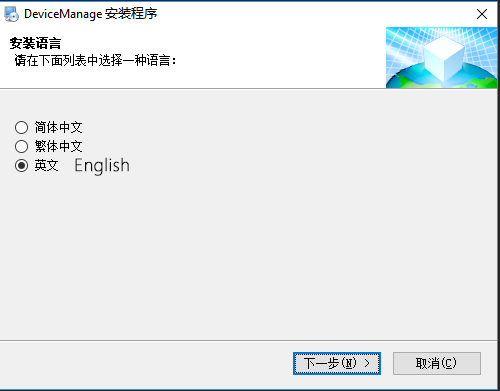
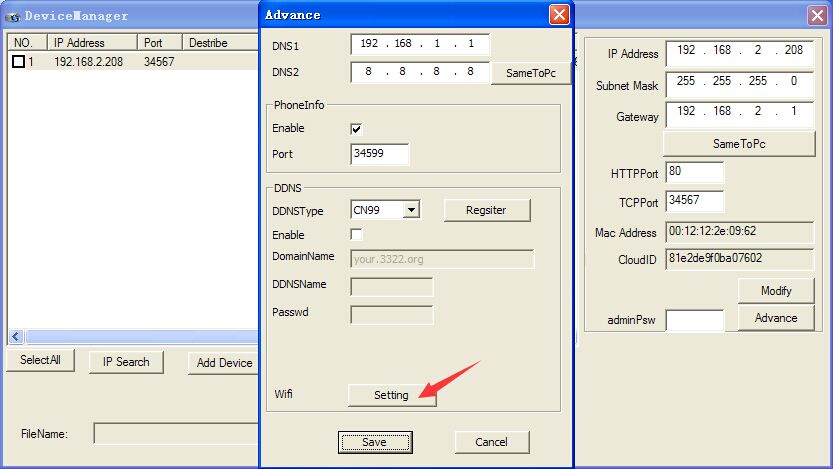
Furthermore, this tool can allow you to upgrade device’s firmware via network. Using “DeviceManager” tool you can upgrade firmware of IPC/DVR/NVR to the latest version. It should be noted all these functions can be achieved by using “DeviceManager” on the premises that the computer and devices are connected the same router or in the same local network.
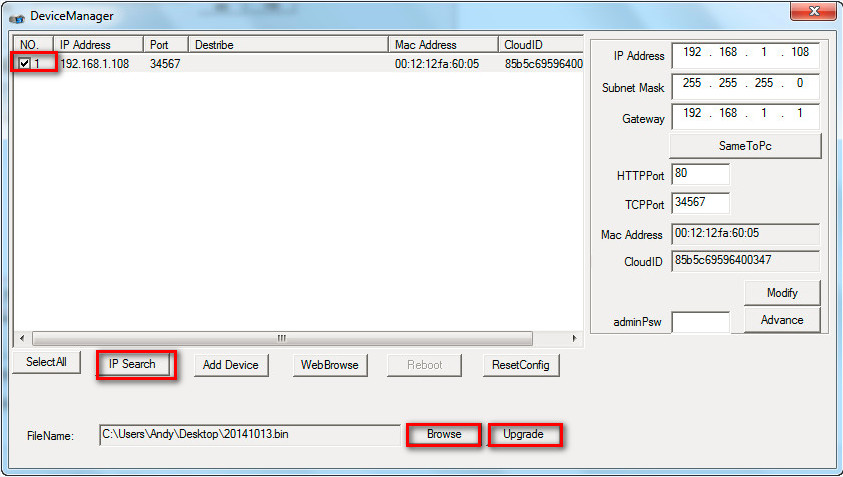
Download DeviceManager Tool
Download link: General_DeviceManage_V2.5.2.2.T.20160827.exe
File name: General_DeviceManage_V2.5.2.2.T.20160827.exe
Type of file: Application (.exe)
File version: 8.1.1006.0
Size: 5.69MB
Compatibility: Windows OS
Virus scan: no virus detected
Anti-virus software: Windows Defender, Malwarebytes, FortiClient, AdAware Free Antivirus, Qihoo 360 Total Security, Comodo Antivirus, Avira, AVG Antivirus, Avast, BitDefender, Panda Cloud Antivirus
H.264 H.265 DVR Firmware List
| DVR Model | Firmware Version | Download Link |
| AHB7004T-EL | V4.02.R11.00000117 | Link |
| AHB7004T-GS-V3 | V4.02.R11.00000171 | Link |
| AHB7004T-LME-V3 | V4.02.R11.00000194 | Link |
| AHB7004T-MH-V2 | V4.02.R11.00000142 | Link |
| AHB7008T-GS-V3 | V4.02.R11.00000170 | Link |
| AHB7008T-LM | V4.02.R11.00000115 | Link |
| AHB7008T-LM-V1 | V4.02.R11.00000148 | Link |
| AHB7008T-LME-V3 | V4.02.R11.00000195 | Link |
| AHB7008T-MH-V2 | V4.02.R11.00000140 | Link |
| AHB7016F-GL-V4 | V4.02.R11.00000175 | Link |
| AHB7016F-GS-V3 | V4.02.R11.00000180 | Link |
| AHB7016F-M | V4.02.R11.00000111 | Link |
| AHB7016T-GS-V3 | V4.02.R11.00000172 | Link |
| AHB7016T-LM | V4.02.R11.00000116 | Link |
| AHB7016T-LME-V3 | V4.02.R11.00000196 | Link |
| AHB7016T-MH-V2 | V4.02.R11.00000146 | Link |
| AHB7032F-GS-V3 | V4.02.R11.00000182 | Link |
| AHB7032F-LM | V4.02.R11.00000135 | Link |
| AHB7032F-LM-V2 | V4.02.R11.00000155 | Link |
| AHB7804R-ELS | V4.02.R11.00000123 | Link |
| AHB7804R-LM-V3 | V4.02.R11.00000191 | Link |
| AHB7804R-LMS | V4.02.R11.00000131 | Link |
| AHB7804R-LMS-V5 | V. 0003121G | Link |
| AHB7804R-LMS-V5 | V. 0003121G | Link |
| AHB7804R-MH-V2 | V4.02.R11.00000149 | Link |
| AHB7804R-MH-V3 | V.0003114A | Link |
| AHB7804R-MS | V4.02.R11.00000133 | Link |
| AHB7804R-MS-V2 | V4.02.R11.00000169 | Link |
| AHB7804T-EL | V4.02.R11.00000114 | Link |
| AHB7804T-MS-V2 | V4.02.R11.00000176 | Link |
| AHB7808R-LM | V4.02.R11.00000126 | Link |
| AHB7808R-MH-V2 | V4.02.R11.00000151 | Link |
| AHB7808R-MS | V4.02.R11.00000144 | Link |
| AHB7808R-MS-V2 | V4.02.R11.00000156 | Link |
| AHB7808T-MS-V2 | V4.02.R11.00000177 | Link |
| AHB8004R-GS | V4.02.R11.0000020R | Link |
| AHB8004R-GS-4PWS | V4.02.R11.0000020Y | Link |
| AHB8004R-GS-4PWS2 | V.213 | Link |
| AHB8004R-MH | V4.02.R11.0000020S | Link |
| AHB8004R-MH-NVT | V.227 | Link |
| AHB8004T-GL | V4.02.R11.0000020D | Link |
| AHB8008R-LME | V4.02.R11.0000020V | Link |
| AHB8008R-MH | V4.02.R11.0000020H | Link |
| AHB8008T-GL | V4.02.R11.0000020B | Link |
| AHB8016T-LME | V4.02.R11.0000020Q | Link |
| AHB8016T-MH | V4.02.R11.0000020G | Link |
| AHB8032F-LME | V4.02.R11.0000020X | Link |
| AHB8804R-LMS | V.0003121H | Link |
| BLK5008A-S | V4.02.R11.00000001 | Link |
| BLK5008L | V4.02.R11.00000002 | Link |
| BLK5016B-S | V4.02.R11.00000003 | Link |
| BLK5016T-S | V4.02.R11.00000026 | Link |
| DBD7004E-P | V4.02.R11.00000132 | Link |
| DVB6504E-P | V4.02.R11.00000066 | Link |
| EVB6504M-PH | V4.02.R11.00000064 | Link |
| INBD8008T-QV | V4.02.R11.0000020I | Link |
| MBD5204S-S | V4.02.R11.00000079 | Link |
| MBD5504T-B | V4.02.R11.00000035 | Link |
| MBD5508T-B | V4.02.R11.00000077 | Link |
| MBD6004G-PL | V4.02.R11.00000073 | Link |
| MBD6004G-PL_25930 | V4.02.R11.00000102 | Link |
| MBD6004G-PL_25930_8SDI | V4.02.R11.00000103 | Link |
| MBD6004Q-H | V4.02.R11.00000093 | Link |
| MBD6004S-S | V4.02.R11.00000092 | Link |
| MBD6004T-FL | V4.02.R11.00000108 | Link |
| MBD6016E-E | V4.02.R11.00000053 | Link |
| MBD6024E-B | V4.02.R11.00000070 | Link |
| MBD6024H-S | V4.02.R11.00000068 | Link |
| MBD6032E-B | V4.02.R11.00000069 | Link |
| MBD6304T | V4.02.R11.00000081 | Link |
| MBD6504E | V4.02.R11.00000062 | Link |
| MBD6508E | V4.02.R11.00000061 | Link |
| MBD6516T-B | V4.02.R11.00000087 | Link |
| MBD6704T | V4.02.R11.00000082 | Link |
| MBD6704T-E | V4.02.R11.00000090 | Link |
| MBD6716T | V4.02.R11.00000084 | Link |
| MBD6804T_EH | V4.02.R11.00000110 | Link |
| MBD6804T-EL | V4.02.R11.00000094 | Link |
| MBD6816T-B | V4.02.R11.00000071 | Link |
| MVB5504E-E | V4.02.R11.00000045 | Link |
| MVB6004D-E | V4.02.R11.00000097 | Link |
| MVB6004L-ES | V4.02.R11.00000101 | Link |
| MVB7004L-LM | V4.02.R11.00000160 | Link |
| NBD5504T-FE | V4.02.R11.00000058 | Link |
| NBD6308T-PL | V4.02.R11.00000083 | Link |
| NBD6508H-PL | V4.02.R11.00000075 | Link |
| NBD6516H-G | V4.02.R11.00000089 | Link |
| NBD6516H-P | V4.02.R11.00000072 | Link |
| NBD6516H-PL | V4.02.R11.00000076 | Link |
| NBD6516T-F | V4.02.R11.00000088 | Link |
| NBD6704T-F | V4.02.R11.00000085 | Link |
| NBD6804T-F | V4.02.R11.00000095 | Link |
| NBD6808T-PL | V4.02.R11.00000099 | Link |
| NBD6904Q-FS | V4.02.R11.00000105 | Link |
| NBD6904T-F | V4.02.R11.00000098 | Link |
| NBD6908T-PL | V4.02.R11.00000104 | Link |
| NBD7004R-FWS | V4.02.R11.00000200 | Link |
| NBD7004R-PWS | V4.02.R11.00000201 | Link |
| NBD7004T-FW | V4.02.R11.00000158 | Link |
| NBD7004T-PW | V4.02.R11.00000178 | Link |
| NBD7008T-PL | V4.02.R11.00000121 | Link |
| NBD7008T-PL-V2 | V4.02.R11.00000192 | Link |
| NBD7016T-F-V2 | V4.02.R11.00000163 | Link |
| NBD7024H-P | V4.02.R11.00000107 | Link |
| NBD7804R-F | V4.02.R11.00000124 | Link |
| NBD7804R-FW | V4.02.R11.00000157 | Link |
| NBD7804R-PW | V4.02.R11.00000168 | Link |
| NBD7804T-F | V4.02.R11.00000118 | Link |
| NBD7808T-PL | V4.02.R11.00000119 | Link |
| NBD7816R-F-V2 | V4.02.R11.00000164 | Link |
| NBD7816T-F | V4.02.R11.00000109 | Link |
| NBD7816T-FS | V4.02.R11.00000113 | Link |
| NBD7904R-FS | V4.02.R11.00000122 | Link |
| NBD7904T-P | V4.02.R11.00000129 | Link |
| NBD7904T-PL | V4.02.R11.00000128 | Link |
| NBD7904T-PL-XPOE | V4.02.R11.0000020K | Link |
| NBD7904T-Q | V4.02.R11.00000127 | Link |
| NBD7908T-Q | V4.02.R11.00000125 | Link |
| NBD8004R-FWS | V4.02.R11.0000020N | Link |
| NBD8004R-PL-EP | V4.02.R11.00000209 | Link |
| NBD8004R-YL-EP | V4.02.R11.0000020E | Link |
| NBD8004RA-ULA | V.0000021Q | Link |
| NBD8004T-QT | V4.02.R11.00000130 | Link |
| NBD8004T-QW | V4.02.R11.00000183 | Link |
| NBD8008R-PL | V4.02.R11.00000203 | Link |
| NBD8008R-PL-EP | V4.02.R11.00000208 | Link |
| NBD8008R-PWS | V4.02.R11.0000020F | Link |
| NBD8008R-PWS-V2 | V.0000021L | Link |
| NBD8008T-Q | V4.02.R11.00000141 | Link |
| NBD8016H-Q | V4.02.R11.00000143 | Link |
| NBD8016H-QT | V4.02.R11.00000159 | Link |
| NBD8016R-PL-V2 | V4.02.R11.00000202 | Link |
| NBD8016T-Q | V4.02.R11.00000188 | Link |
| NBD8025R-PL | V4.02.R11.00000197 | Link |
| NBD8032H-P | V4.02.R11.00000179 | Link |
| NBD8032H-Q | V4.02.R11.00000136 | Link |
| NBD8032H-QE | V4.02.R11.00000189 | Link |
| NBD8064H-P | V4.02.R11.00000161 | Link |
| NBD8128H-Q | V4.02.R11.00000162 | Link |
| NBD8904T-GS-XPOE | V.212 | Link |
| NBD8904T-Q | V4.02.R11.00000152 | Link |
| NBD8908T-Q | V4.02.R11.00000153 | Link |
| NBD8916F-Q | V4.02.R11.00000185 | Link |
| NKB6009D | V4.02.R11.00000100 | Link |
| XM-JPN1-W | V4.02.R11.00000186 | Link |