
Views: 184
Akuvox Firmware All Devices v1, The Akuvox Company is a global leading provider of smart intercom and smart home products and solutions. The company is committed to unleashing the power of technologies to improve people’s lives with better communication, greater security, and more convenience.
Our products and solutions have been deployed and used daily in more than 100 countries and regions, meeting customer needs in various vertical markets that range from residential to commercial, from healthcare to public safety.
Confirm Device Hardware Version
Some of Akuvox’s devices have more than one hardware version. Therefore, when upgrading devices, you need to confirm the device hardware version.
Devices that have two hardware versions include:
Devices that have three hardware versions include:
Take R20K for example in this part.
Label
The hardware version can be checked on the device’s back label.
“V2.0” on the back label represents hardware version 2 and “V3.0” represents hardware version 3.

Exception

Product Information
Device hardware can also be checked on the device web interface.
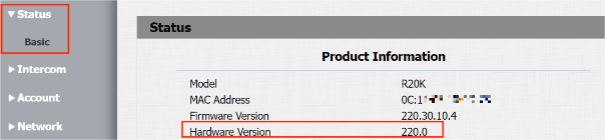
20.X is hardware version 1.
220.X is hardware version 2.
320.X is hardware version 3.
Identify Device Firmware Version
When upgrading devices, you need to confirm that the firmware version complies with the device model.
Take the R29 version for example:
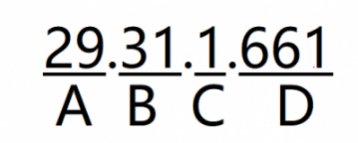
We can divide the firmware version number into four parts: A, B, C, and D.
A
A represents different models.
Note
When upgrading devices, the firmware version must match the device hardware version. Some devices have two or three hardware versions.
Please read Confirm Device Hardware Version to check how to identify the hardware version.
| Model | R29 | X915 | R20 | R20V3 | R20V5 | X912 | S539 | E12 | E16V2 | E16 |
| Version Number | 29 | 915 | 20 | 220 | 320 | 912 | 539 | 12 | 216 | 116 |
.
| Model | R27 | R28 | E18 | E21V2 | E20 | X916 | E11 | S532 |
| Version Number | 27 | 28 | 18 | 221 | 120 | 916 | 111 | 532 |
| Model | C313 | C313V2
. |
C319 | S567 | S565 | S563 | S562 | IT88 | X933 | IT83 | C315 |
| Version Number | 113 | 213 | 119 | 567 | 565 | 563 | 562 | 88 | 933 | 83 | 115 |
| Model | A01/A02 | A03 | A05 | A08 | A092/A094 |
| Version number | 101 | 103 | 105 | 108 | 92 |
B
B represents different OEMs.
C
C represents different branches. If the number is 10 and above, the device is in the firmware version with high security mode. It is designed to enhance security. It employs encryption across various facets, including the communication process, door-opening commands, password storage methods, and more.
D
The higher the value is, the newer the version is when devices have the same model, OEM, and branch.
Acquire the Latest Firmware
You can get the latest firmware through the following channels.
Obtain via Knowledge Base
Step 1
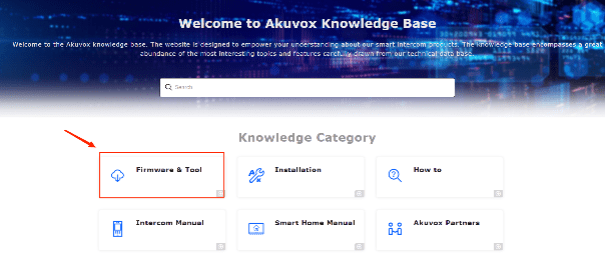
Visit the website: https://knowledge.akuvox.com/v1/en

Step 2
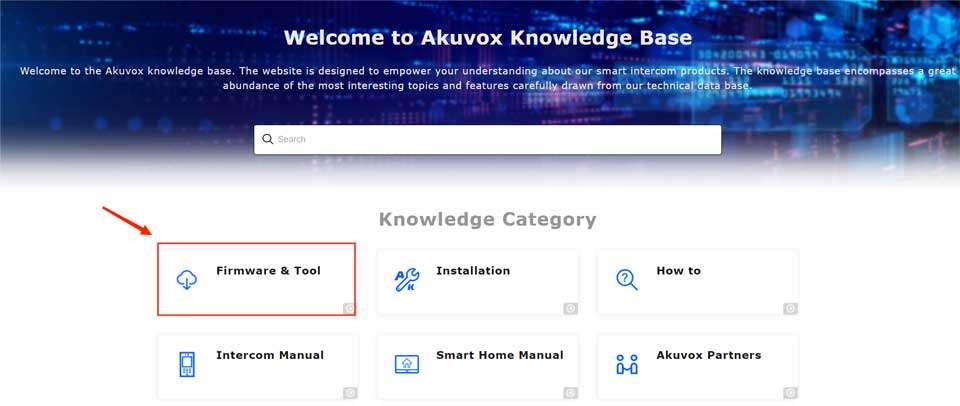
Click on Firmware & Tool to go to the specific category of firmware.

Step 3
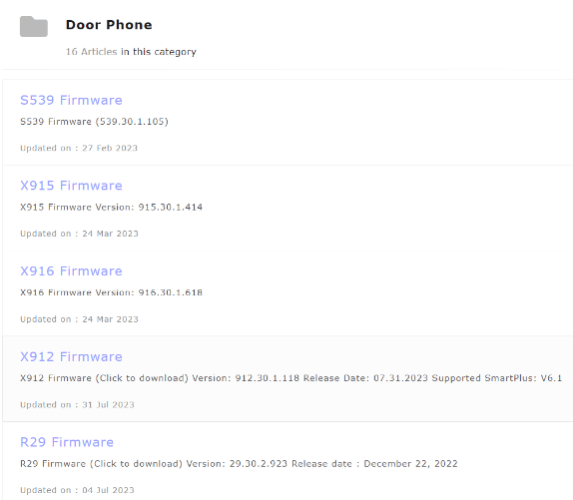
Click on the desired category to display all the latest firmware. Here, we take Door Phone for instance.
Step 4
Note
Other Channels
If you need a customized or third-party compatible firmware version, you can contact the Akuvox Tech Team through the following channels.
Upgrade Devices
Akuvox devices can be updated on the Akuvox Cloud platform or the device web interface. The updated firmware fixed some bugs and provides new features. Follow the steps to update devices.
Upgrade on Akuvox Cloud Platform
If the device is connected to Akuvox Cloud, update devices directly on the Cloud platform.
Upgrade on Device Web Interface
Take door phone R29 for example.
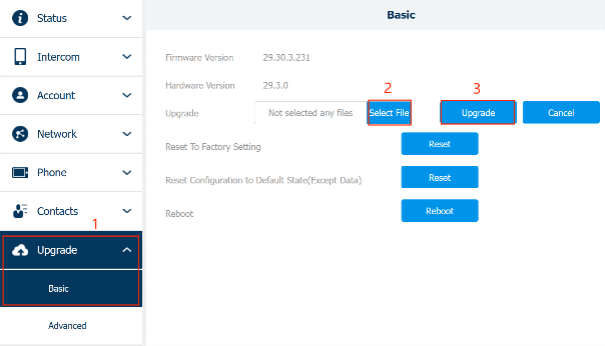
1. Log into the device web interface. The default username and password are admin.
2. Navigate to Upgrade > Basic. Click on Select File to import the firmware from the local driver and then Upgrade.
Note
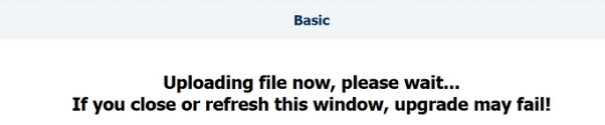
3. When upgrading, do not close or refresh the upgrading window.
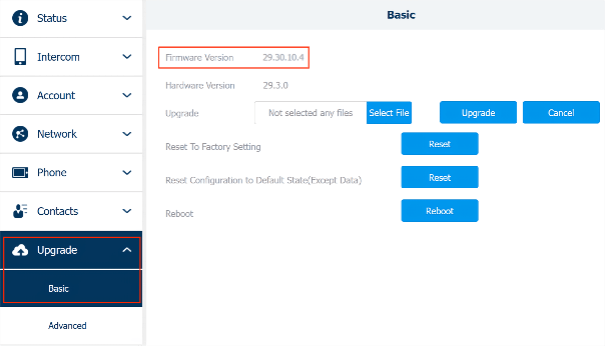
4. After the upgrade, check whether the device version is updated on Upgrade > Basic interface.
.
Door Phone
.
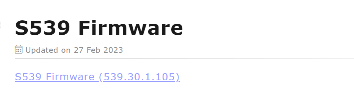
S539 Firmware
S539 Firmware (Click to download) Version: 539.30.10.6 Release Date: Oct 09, 2023
.
Updated on : 09 Oct 2023
.
X915 Firmware
X915 V1.0 Firmware (Click to download) Version: 915.30.10.14 Release Date: Oct 9, 2023 X915 V2.0 Firmware (Click to download) Version: 2915.30.10.9 Release Date: Oct 9, 2023
.
Updated on : 09 Oct 2023
.
X916 Firmware
X916 Firmware (Click to download) Version: 916.30.10.7 Release Date: Oct 13, 2023
.
Updated on : 13 Oct 2023
.
X912 Firmware
X912 Firmware (Click to download) Version: 912.30.1.140 Release Date: April 4, 2024
.
Updated on : 03 Apr 2024
.
R29 Firmware
R29 Firmware (Click to download) Version: 29.30.10.125 Release date : Apr 7, 2024
.
Updated on : 07 Apr 2024
.
R28 Firmware
R28 Firmware (Click to download) Version: 28.30.10.7 Release Date: November 21, 2023
.
Updated on : 25 Jan 2024
.
R27 Firmware
R27 Firmware (Click to download) Version: 227.30.10.5 Release Date: Oct 10, 2023
.
Updated on : 10 Oct 2023
.
R26 Firmware
R26 Firmware V2.0 Version: 226.30.2.109 Release Date: 09.24.2021
.
Updated on : 18 Sep 2023
.
R20A Firmware
R20A V3.0 Firmware (Click to download) Version: 220.30.3.7 Release Date: May 18, 2022 R20A V5.0 Firmware (Click to download) Version: 320.30.10.9 Release Date: October 10, 2023
.
Updated on : 18 Apr 2024
.
R20A-2 Firmware
R20A-2 V3.0 Firmware (Click to download) Version: 220.30.3.7 Release Date: May 18, 2022 R20A-2 V5.0 Firmware (Click to download) Version: 320.30.10.9 Release Date: October 10, 2023 R20A-2 Firmware [for Kit] (Click to downloa…
.
Updated on : 18 Apr 2024
.
R20K Firmware
R20K V2.0 Firmware (Click to download) Version: 220.30.3.7 Release Date: May 18, 2022 R20K V3.0 Firmware (Click to download) Version: 320.30.10.9 Release Date: October 10, 2023
.
Updated on : 18 Apr 2024
.
R20K-2 Firmware
R20K-2 V2.0 Firmware (Click to download) Version: 220.30.3.7 Release Date: May 18, 2022 R20K-2 V3.0 Firmware (Click to download) Version: 320.30.4.138 Release Date: February 21, 2024
.
Updated on : 21 Feb 2024
.
R20B Firmware
R20B V1.0 Firmware (Click to download) Version: 220.30.3.7 Release Date: May 18, 2022 R20B V2.0 Firmware (Click to download) Version: 320.30.10.9 Release Date: October 10, 2023
.
Updated on : 18 Apr 2024
.
E18 Firmware
E18 Firmware (Click to download) Version: 18.30.10.72 Release Date : January 19, 2024
.
Updated on : 19 Jan 2024
.
E16 Firmware
E16 V1.0 Firmware (Click to download) Version: 116.30.10.44 Release Date: January 19, 2024 E16 V2.0 (Click to download) Version: 216.30.10.24 Release Date: Oct 17, 2023
.
Updated on : 19 Jan 2024
.
E12 Firmware
E12 V1.0 Firmware (Click to download) Version: 12.30.2.102 Release Date: Aug 25, 2022 E12 V2.0 Firmware (Click to download) Version: 312.30.10.9 Release Date: Oct 10, 2023 E12 Firmware [for Kit] (Click to download) Versio…
.
Updated on : 31 Oct 2023
.
E21 Firmware
E21 Firmware V1.0 (Click to download) Version: 21.31.5.11 Release Date: 06.05.2019 E21 Firmware V2.0 (Click to download) Version: 221.30.1.106 Release Date: 05.21.2020 E21 Firmware V3.0 (Click to download) Version: 321.3…
.
Updated on : 28 Mar 2024
.
E20 Firmware
E20 Firmware (Click to download) Version: 120.1.1.30 Release Date: March 15, 2024
.
Updated on : 15 Mar 2024
.
E11 Firmware
E11 Firmware (Click to download) Firmware Version : 111.30.10.12 Release Date : Oct 17, 2023
.
Updated on : 17 Oct 2023
Indoor Monitor
.
S567 Firmware
S567 Firmware (Click to download) Version: 567.30.12.3 Release Date: April 19, 2024
.
Updated on : 19 Apr 2024
.
S563 Firmware
S563 Firmware (Click to download) Version: 563.30.12.104 Release Date: April 19, 2024
.
Updated on : 19 Apr 2024
.
IT88 Firmware
IT88 Firmware (Click to download) Version: 88.30.10.9 Release Date: Oct 13, 2023
.
Updated on : 13 Oct 2023
.
IT83 Firmware
IT83 Firmware (Click to download) Version: 83.30.10.4 Release Date: Oct 13, 2023
.
Updated on : 13 Oct 2023
.
IT82 Firmware
IT82 Firmware (Click to download) Version: 82.30.10.4 Release Date: Oct 13, 2023
.
Updated on : 13 Oct 2023
.
X933 Firmware
X933 Firmware (Click to download) Version: 933.30.10.6 Release Date: Oct 13, 2023
.
Updated on : 13 Oct 2023
.
C319 Firmware
C319 Firmware (Click to download) Version: 119.30.10.19 Release Date: Oct 13, 2023
.
Updated on : 13 Oct 2023
.
C313 Firmware
C313 V1.0 Firmware (Click to download) Version: 113.30.10.28 Release Date: Oct 13, 2023 C313 V2.0 Firmware (Click to download) Version: 213.30.10.100 Release Date: Oct 13, 2023
.
Updated on : 13 Oct 2023
.
C313-2 Firmware
C313-2 Firmware (Click to download) Version: 212.30.10.12 Release Date: Oct 13, 2023
.
Updated on : 13 Oct 2023
.
C315 Firmware
C315 Firmware (Click to download) Version: 115.30.10.6 Release Date: Oct 13, 2023
.
Updated on : 13 Oct 2023
.
C317 Firmware
C317 Firmware (Click to download) Version: 117.30.10.4 Release Date: Oct 13, 2023
.
Updated on : 13 Oct 2023
.
C312 Firmware
C312 Firmware (Click to download) Version: 112.30.2.4 Release Date: 12.03.2019
.
Updated on : 05 Sep 2023
Access Control
.
A094 Firmware
A094 Firmware (Click to download) Version: 92.30.10.4 Release Date: March 26, 2024
.
Updated on : 26 Mar 2024
.
A092 Firmware
A092 Firmware (Click to download) Version: 92.30.10.4 Release Date: April 22, 2024
.
Updated on : 22 Apr 2024
.
A05 Firmware
A05 Firmware (Click to download) Version: 105.30.10.13 Release Date: January 19, 2024
.
Updated on : 19 Jan 2024
.
A01 Firmware
A01 Firmware (Click to download) Version: 101.30.10.49 Release Date: April 22, 2024
.
Updated on : 22 Apr 2024
.
A02 Firmware
A02 Firmware (Click to download) Version: 101.30.10.49 Release Date: April 22, 2024
.
Updated on : 22 Apr 2024
.
A03 Firmware
A03 Firmware (Click to download) Version: 103.30.10.18 Release Date: January 19, 2024
.
Updated on : 19 Jan 2024
Android Video Phone
.
R49 Firmware
R49 Cloud Firmware (Click to download) Version: 49.30.10.6 Release Date: April 19, 2024 R49 Normal Firmware Version: 49.0.5.8
.
Updated on : 19 Apr 2024
HyPanel
.
HyPanel Firmware
Firmware (Click to download) Version: 51.1.31.30 Release Date: March 26, 2024
.
Updated on : 26 Mar 2024
.
HyPanel Pro Firmware
Firmware (Click to download) Version: 71.1.31.37 Release Date: Marc 26, 2024
.
Updated on : 26 Mar 2024
.
HyPanel Lux Firmware
Firmware (Click to download) Version: 61.1.23.23 Release Date: December 11, 2023
.
Updated on : 11 Dec 2023
.
HyPanel Plus Firmware
HyPanel Plus Firmware (Click to download) Version: 52.1.23.42 Release Date: December 29, 2023
.
Updated on : 29 Dec 2023
.
HyPanel Lite Firmware
Firmware (Click to download) Version: 41.1.31.13 Release Date: March 8, 2024
.
Updated on : 08 Mar 2024
SmartPanel
.
SmartPanel Firmware
Firmware (Click to upgrade) Version: 933.30.207.138 Release Date: March 24, 2023
.
Updated on : 14 Apr 2023
.
SmartPanel Pro Firmware
Firmware (Click to download) Version: 119.30.207.110 Release Date: March 31, 2023
.
Updated on : 04 Apr 2023
Tool & Software
.
Akuvox IP scanner
.
Updated on : 08 May 2023
.
ACMS
.
Updated on : 04 Mar 2024
.
SDMC
.
Updated on : 30 Jun 2023
.
Akuvox Sight
.
Updated on : 27 Apr 2023
.
My MobileKey
Click to download Android: IOS:
.
Updated on : 13 Sep 2023
Cloud
.
SmartPlus App
Click to download: Android: IOS:
.
Updated on : 12 Sep 2023
.
BelaHome App
Click to download: Android: IOS:
.
Updated on : 12 Sep 2023
.